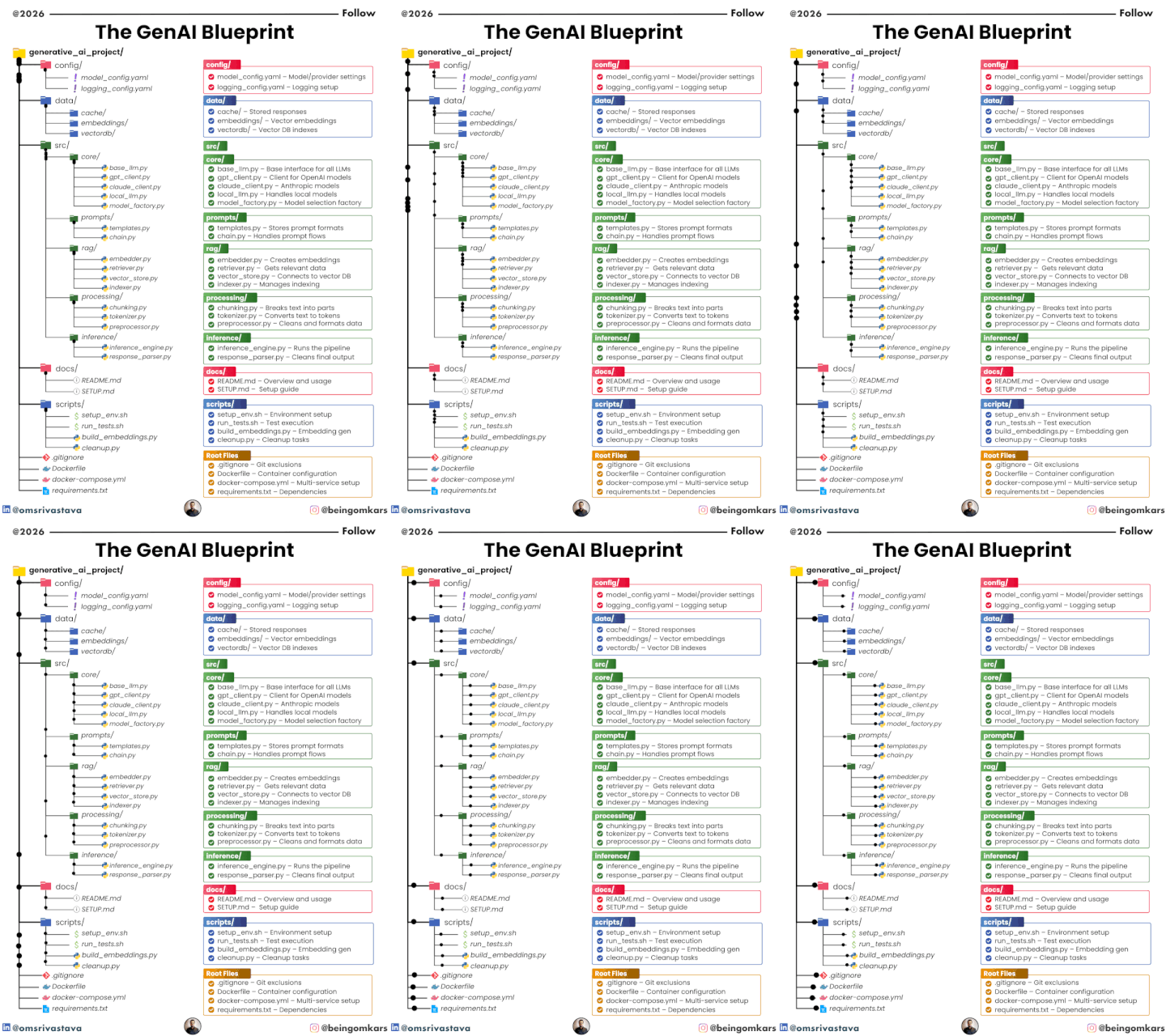
The GenAI Blueprint (2026): A Step-by-Step Guide to Building Production-Ready AI Systems
Generative AI projects often start as quick experiments—but scaling them into reliable, production-grade systems is where most teams struggle. The GenAI Blueprint (2026) provides a structured, modular approach to designing AI applications that are maintainable, flexible, and scalable.
This guide walks you through the architecture step by step, explaining not just what each component is, but how to implement it effectively.
🧭 1. Understanding the Architecture Philosophy
Before diving into folders and files, it’s important to understand the design principles behind this blueprint:
✔ Separation of Concerns
Each part of the system has a clearly defined responsibility (data, prompts, inference, etc.).
✔ Modularity
Components can be swapped or upgraded independently (e.g., changing OpenAI to another provider).
✔ Scalability
Designed to handle increasing data, users, and complexity.
✔ RAG-First Approach
Built with Retrieval-Augmented Generation at its core for accuracy and context.
⚙️ 2. Configuration Layer (config/)
🎯 Purpose
Centralize all system-level settings so you never hardcode values.
📁 Files
model_config.yamllogging_config.yaml
🛠 How to Implement
- Define model providers (OpenAI, Anthropic, local models)
- Store API keys via environment variables
- Configure temperature, max tokens, retries
- Set logging levels (INFO, DEBUG, ERROR)
💡 Best Practices
- Keep configs environment-specific (dev, staging, prod)
- Never store secrets directly in files
- Use
.envwith a loader likepython-dotenv
💾 3. Data Layer (data/)
🎯 Purpose
Manage embeddings, caching, and vector databases.
📁 Structure
cache/embeddings/vectordb/
🛠 How to Implement
- Embedding Generation
- Use models like text-embedding APIs
- Store vectors efficiently (NumPy, FAISS, etc.)
- Vector Database
- Choose tools like Pinecone, Weaviate, or FAISS
- Store metadata alongside vectors
- Caching
- Cache frequent queries to reduce API cost
💡 Best Practices
- Normalize embeddings before storage
- Use batch processing for large datasets
- Periodically rebuild indexes
🧠 4. Core Layer (src/core/)
🎯 Purpose
Abstract and manage all LLM interactions.
📁 Files
base_llm.pygpt_client.pyclaude_client.pylocal_llm.pymodel_factory.py
🛠 How to Implement
- Create a base class defining:
generate()stream()embed()
- Implement provider-specific clients
- Use a factory pattern to dynamically select models
💡 Example Workflow
model = ModelFactory.get_model("gpt-4")
response = model.generate(prompt)
💡 Best Practices
- Standardize input/output format across providers
- Add retry and fallback mechanisms
- Log all model interactions
📝 5. Prompt Layer (src/prompts/)
🎯 Purpose
Manage prompts as reusable, version-controlled assets.
📁 Files
templates.pychain.py
🛠 How to Implement
- Store prompts as templates:
SUMMARY_PROMPT = "Summarize the following:\n{input}"
- Build prompt chains:
- Input → Transform → Generate → Refine
💡 Best Practices
- Version prompts like code
- Test prompts with multiple inputs
- Avoid hardcoding prompts inside business logic
🔍 6. RAG Layer (src/rag/)
🎯 Purpose
Enable context-aware AI using external data.
📁 Files
embedder.pyretriever.pyvector_store.pyindexer.py
🛠 How to Implement
Step 1: Chunk Data
Break documents into smaller parts for better retrieval.
Step 2: Create Embeddings
Convert chunks into vector representations.
Step 3: Store in Vector DB
Index embeddings for fast similarity search.
Step 4: Retrieve Context
Fetch relevant chunks for user queries.
Step 5: Augment Prompt
Combine retrieved data with user input.
💡 Best Practices
- Tune chunk size (too small = loss of context, too large = inefficiency)
- Use hybrid search (keyword + vector)
- Re-rank results for accuracy
🔄 7. Processing Layer (src/processing/)
🎯 Purpose
Prepare raw data for model consumption.
📁 Files
chunking.pytokenizer.pypreprocessor.py
🛠 How to Implement
- Clean text (remove noise, HTML, duplicates)
- Tokenize input for model limits
- Split documents intelligently
💡 Best Practices
- Preserve semantic meaning during chunking
- Use language-aware tokenizers
- Track token usage for cost optimization
⚡ 8. Inference Layer (src/inference/)
🎯 Purpose
Execute the full AI pipeline.
📁 Files
inference_engine.pyresponse_parser.py
🛠 How to Implement
- Receive user input
- Retrieve context (RAG)
- Build prompt
- Call LLM
- Parse and format response
💡 Example Flow
query → retriever → prompt → LLM → parser → response
💡 Best Practices
- Add latency tracking
- Implement streaming responses
- Validate outputs before returning
📚 9. Documentation (docs/)
🎯 Purpose
Ensure clarity and onboarding efficiency.
📁 Files
README.mdSETUP.md
🛠 What to Include
- Installation steps
- Environment setup
- Example usage
- API documentation
🛠️ 10. Scripts (scripts/)
🎯 Purpose
Automate repetitive tasks.
📁 Files
setup_env.shrun_tests.shbuild_embeddings.pycleanup.py
🛠 Use Cases
- Environment setup
- Running pipelines
- Data preprocessing
- Maintenance
📦 11. Root-Level Setup
Key Files
.gitignore→ Clean version controlDockerfile→ Containerized deploymentdocker-compose.yml→ Multi-service orchestrationrequirements.txt→ Dependencies
💡 Best Practices
- Use Docker for consistency
- Separate dev and production environments
- Automate deployments via CI/CD
🚀 12. Putting It All Together
Here’s how the full system works in real life:
- User submits a query
- System processes input
- RAG retrieves relevant context
- Prompt is constructed
- LLM generates response
- Output is cleaned and returned
🧩 13. Common Mistakes to Avoid
- ❌ Hardcoding prompts or configs
- ❌ Ignoring logging and monitoring
- ❌ Poor chunking strategies
- ❌ No fallback for model failures
- ❌ Mixing business logic with AI logic
🔮 14. Future-Proofing Your GenAI System
To stay ahead:
- Support multiple LLM providers
- Add evaluation pipelines
- Track performance metrics
- Continuously refine prompts and embeddings
🏁 Final Thoughts
The GenAI Blueprint (2026) is more than a folder structure—it’s a production mindset. By following this guide, you can build AI systems that are:
- Reliable
- Scalable
- Easy to maintain
- Ready for real-world deployment
Whether you’re building chatbots, recommendation engines, or enterprise AI tools, this architecture gives you a solid foundation to grow.