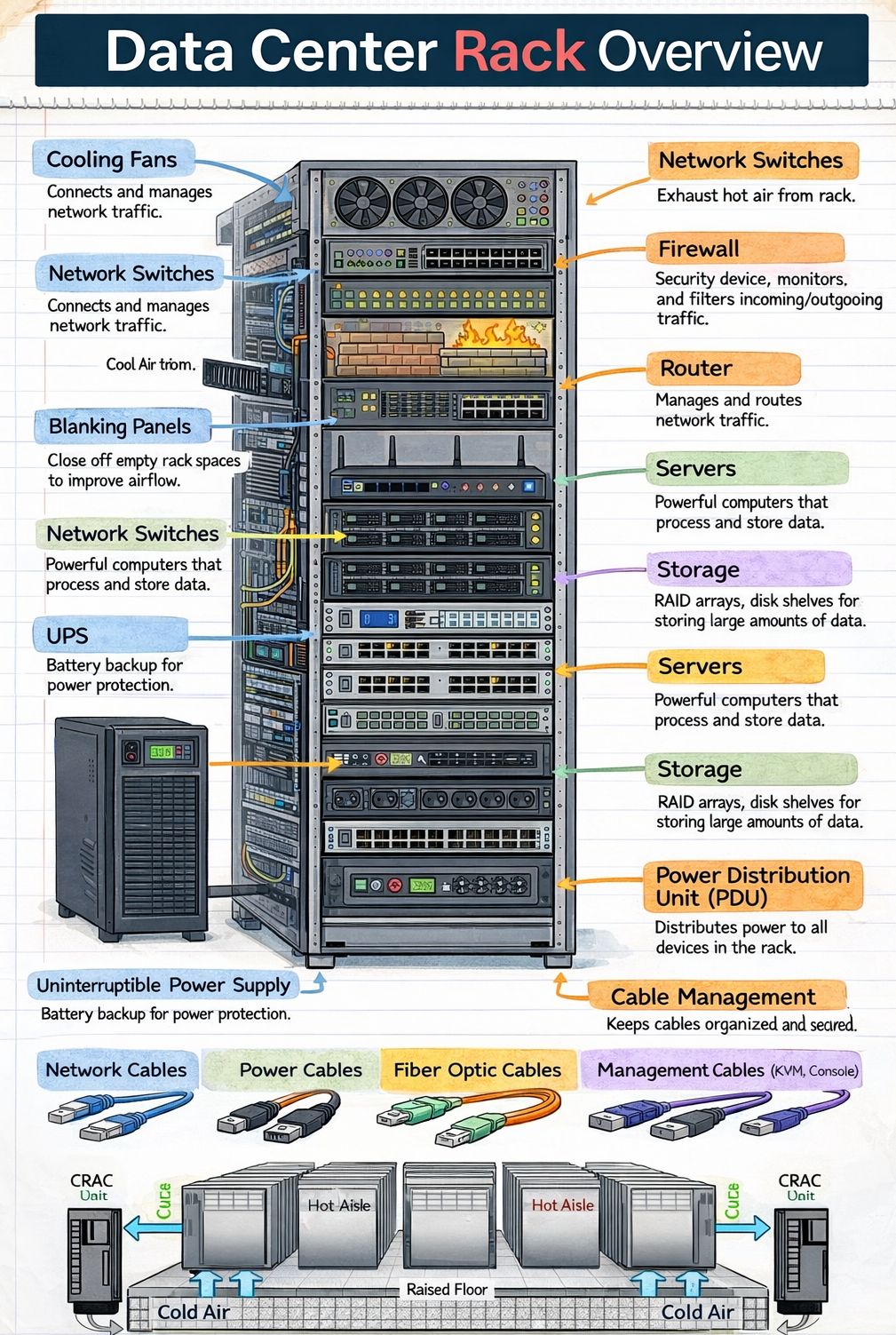
Imagine a library where every book is a server, storing and processing vast amounts of digital information. Now picture those books neatly arranged on shelves—except these shelves are metal frames, bolted to the floor, and designed to hold not books, but powerful computing equipment. That’s essentially what a data center rack is: a structured framework that houses servers, networking devices, storage systems, and other critical IT hardware in an organized, efficient, and secure manner.
Data center racks are the backbone of modern digital infrastructure. Whether you’re streaming a video, making an online purchase, or accessing cloud-based software, the data you’re interacting with likely passes through equipment mounted in one of these racks. They are not just storage units—they are carefully engineered systems that support the physical, electrical, and thermal needs of high-performance computing environments.
As data consumption continues to grow exponentially, the role of the data center rack becomes increasingly vital. From small server rooms to massive hyperscale data centers spanning acres, racks provide the standardized, scalable foundation upon which digital services are built. Understanding what they are, how they work, and why they’re essential offers valuable insight into the invisible machinery that powers our connected world.
Anatomy of a Data Center Rack
A data center rack is more than just a metal cabinet. It is a precisely designed structure built to meet strict industry standards, ensuring compatibility, safety, and efficiency. Most racks used in data centers today follow the EIA-310 standard, established by the Electronic Industries Alliance, which defines dimensions, mounting hole patterns, and structural requirements.
Standard Dimensions and Form Factors
The most common rack width is 19 inches (482.6 mm), a standard that has been in place since the mid-20th century. This width allows equipment from different manufacturers to be mounted uniformly. Racks are typically 42U (units) tall, though 45U, 48U, and even taller configurations exist. One “U” equals 1.75 inches (44.45 mm), and it represents the vertical space allocated for a single piece of equipment.
Racks also come in various depths—commonly 600mm, 800mm, 1000mm, and 1200mm—to accommodate different types of hardware. Deeper racks are often used for high-density servers or networking gear that requires more internal space for cabling and airflow.
Structural Components
A typical rack consists of four vertical posts connected by top and bottom frames. These posts have evenly spaced holes—usually square or round—for mounting equipment using screws or cage nuts. The frame is often made of steel or aluminum, providing strength while remaining relatively lightweight.
Many racks include side panels, front and rear doors, and a roof or canopy. These enclosures help manage airflow, reduce noise, and enhance security. Perforated doors are common to allow air circulation, while solid doors may be used in environments where noise or light control is a priority.
Mounting and Accessories
Equipment is mounted using rails or brackets that slide into the rack posts. Rails can be fixed, sliding, or telescopic, depending on the need for accessibility. Sliding rails allow technicians to pull servers out for maintenance without disconnecting cables, which is especially useful in high-density setups.
Additional accessories include cable management arms, vertical and horizontal cable trays, power distribution units (PDUs), and blanking panels. Blanking panels are simple but important—they fill unused U spaces to prevent hot and cold air from mixing, improving cooling efficiency.
Types of Data Center Racks
Not all racks are created equal. Depending on the environment, workload, and operational requirements, different types of racks are deployed. The choice of rack can significantly impact performance, scalability, and energy efficiency.
Open Frame Racks
Open frame racks consist of vertical posts without side panels or doors. They offer maximum airflow and easy access to equipment, making them ideal for environments where cooling and maintenance are top priorities. These racks are commonly used in telecom centers and some enterprise data centers, especially where space is limited or where equipment generates minimal heat.
However, open racks offer less physical security and dust protection, which may be a concern in less controlled environments.
Enclosed Racks (Cabinet Racks)
Enclosed racks, also known as cabinet racks, feature full side panels, front and rear doors, and often a lockable design. They provide better protection against dust, unauthorized access, and accidental contact. Many enclosed racks are designed with integrated cooling systems, such as fans or air conditioning units, to manage internal temperatures.
These racks are widely used in enterprise data centers, colocation facilities, and edge computing locations where security and environmental control are critical.
Wall-Mounted Racks
Wall-mounted racks are smaller units designed to be attached directly to a wall. They are typically used in small offices, network closets, or remote locations where floor space is limited. While they can hold a few servers or networking devices, they are not suitable for high-density deployments due to weight and cooling limitations.
High-Density and Hyperscale Racks
As computing demands grow, so does the need for higher power and cooling capacity. High-density racks are engineered to support equipment that consumes more than 10kW per rack, sometimes exceeding 30kW. These racks often feature enhanced structural support, advanced cable management, and integrated liquid cooling options.
Hyperscale data centers—those operated by companies like Google, Amazon, and Microsoft—use custom or semi-custom rack designs optimized for massive scale. These racks may include features like rear-door heat exchangers, in-row cooling, and modular power systems to support thousands of servers in a single facility.
Power and Cooling Considerations
One of the most critical aspects of rack design is managing power and heat. Servers and networking equipment generate significant amounts of heat, and if not properly managed, this can lead to hardware failure, reduced performance, and increased energy costs.
Power Distribution
Power distribution units (PDUs) are essential components mounted inside or alongside racks. They take incoming electrical power and distribute it to multiple outlets, allowing each piece of equipment to be powered independently. PDUs come in two main types: basic and intelligent (or smart) PDUs.
Basic PDUs simply provide power outlets, while intelligent PDUs offer remote monitoring, metering, and control capabilities. They can report power consumption per outlet or per phase, enabling data center operators to optimize energy usage and prevent overloads.
Racks are typically connected to redundant power sources (A and B feeds) to ensure continuous operation in case of a power failure. This redundancy is a key feature of Tier 3 and Tier 4 data centers, which are designed for high availability.
Thermal Management
Heat management is a major challenge in data centers. As equipment density increases, so does the heat output per square foot. Without proper cooling, temperatures can rise rapidly, leading to thermal throttling or hardware damage.
Most data centers use a hot aisle/cold aisle layout. In this configuration, racks are arranged in alternating rows with cold air intakes facing one direction and hot exhausts facing the opposite. Cold air is supplied through raised floors or overhead ducts, while hot air is extracted through ceiling vents or in-row coolers.
Racks themselves play a role in airflow management. Blanking panels, proper cable routing, and perforated doors help maintain consistent airflow. Some advanced racks include built-in fans or liquid cooling systems, where coolant is circulated through plates attached to servers or directly into the rack frame.
Liquid cooling is becoming more common in high-density environments. It is far more efficient than air cooling for removing heat from powerful processors and GPUs. While more complex to implement, it allows for higher rack densities and lower energy consumption.
Cable Management and Organization
In a data center, cables are the nervous system—transmitting data, power, and signals between devices. Poor cable management can lead to airflow blockage, increased heat, difficulty in maintenance, and higher risk of human error during upgrades or troubleshooting.
Best Practices for Cable Routing
Effective cable management starts with planning. Cables should be grouped by type (power, network, fiber) and routed neatly along designated pathways. Horizontal cable managers are used between racks or within the rack to organize patch cables, while vertical managers run along the sides to handle longer runs.
Using color-coded cables can help technicians quickly identify connections. For example, blue for network, red for critical systems, and green for management interfaces. Labels should be attached to both ends of each cable, indicating source and destination.
It’s also important to leave slack—enough cable to allow for movement during maintenance, but not so much that it creates clutter. Excess cable should be coiled neatly and secured with Velcro straps (not zip ties, which are harder to remove).
Impact on Performance and Maintenance
Well-managed cabling improves airflow, reduces the risk of accidental disconnections, and makes troubleshooting faster. In high-density racks, where dozens of cables may be connected to a single server, organization is not just a matter of aesthetics—it’s a operational necessity.
Automated cable management systems are emerging, using sensors and software to monitor cable status and detect faults. While still in early adoption, these systems promise to reduce downtime and improve reliability in large-scale data centers.
Security and Access Control
Physical security is a critical component of data center operations. Racks often contain sensitive equipment and data, making them potential targets for theft, tampering, or sabotage.
Locking Mechanisms
Most enclosed racks come with lockable front and rear doors. Locks can be keyed, combination, or electronic (such as RFID or biometric systems). In high-security environments, racks may be housed in locked cages within the data center, with access restricted to authorized personnel only.
Some racks also include intrusion detection systems that alert administrators if a door is opened without authorization. These systems can be integrated with the data center’s overall security monitoring platform.
Environmental Monitoring
In addition to physical locks, many racks are equipped with environmental sensors that monitor temperature, humidity, smoke, and water leaks. These sensors provide real-time alerts, allowing staff to respond quickly to potential threats before they cause damage.
Remote monitoring is increasingly common, with data sent to centralized management systems. This allows operators to oversee multiple racks across different locations from a single dashboard.
Scalability and Future-Proofing
As technology evolves, so must the infrastructure that supports it. Data center racks are designed with scalability in mind, allowing organizations to expand their IT capacity without overhauling the entire system.
Modular Design
Modular racks can be easily reconfigured or expanded. Components like side panels, doors, and shelves can be added or removed as needed. This flexibility is especially valuable in colocation facilities, where tenants may change their hardware requirements over time.
Support for Emerging Technologies
Modern racks are built to accommodate new technologies such as AI accelerators, high-speed networking (like 400GbE), and edge computing devices. They must support higher power densities, faster data transfer rates, and more complex cooling needs.
Future-proofing also involves choosing racks with sufficient space and structural strength to handle heavier equipment. As servers become more powerful, their weight increases, requiring stronger frames and better weight distribution.
Key Takeaways
- A data center rack is a standardized metal frame used to house servers, networking equipment, and other IT hardware in an organized and efficient manner.
- Most racks follow the 19-inch EIA-310 standard and are measured in “U” units, with common heights of 42U or 48U.
- Racks come in various types, including open frame, enclosed, wall-mounted, and high-density models, each suited to different environments and workloads.
- Power and cooling are critical considerations. Intelligent PDUs and advanced thermal management systems help maintain performance and reduce energy costs.
- Effective cable management improves airflow, simplifies maintenance, and reduces the risk of errors.
- Security features such as lockable doors, environmental monitoring, and access control systems protect equipment and data.
- Scalable and modular rack designs allow data centers to adapt to changing technology and growing demands.
Frequently Asked Questions
What is a “U” in a data center rack?
A “U” stands for “unit” and is a standard measurement of vertical space in a rack. One U equals 1.75 inches (44.45 mm). Equipment such as servers, switches, and storage devices are designed to occupy a specific number of U spaces. For example, a 2U server takes up two units of vertical space.
Can I use any server in a standard rack?
Most servers are designed to fit in standard 19-inch racks, but compatibility depends on depth, weight, and mounting requirements. Always check the manufacturer’s specifications to ensure the server matches the rack’s dimensions and load capacity. Additionally, power and cooling needs must be considered to avoid overloading the rack.
How much power can a typical rack handle?
The power capacity of a rack varies widely. Traditional racks may support 3kW to 8kW, while high-density racks can handle 15kW to 30kW or more. The actual limit depends on the facility’s electrical infrastructure, cooling capacity, and the type of equipment installed. Intelligent PDUs help monitor and manage power usage to prevent overloads.